Alpukato: A Handwritten Font That Elevates Digital Branding
It was a late afternoon when I first placed Alpukato into the hero section of a boutique online store I was redesigning. The moment the font rendered on screen, I knew this wasn’t just another script font—it had a soul. With its organic curves and gentle slant, Alpukato brought warmth to what felt like a sterile digital space. As a web designer, I’ve tested countless fonts, but Alpukato stood out for its ability to blend creativity with usability.
What Makes Alpukato Unique?
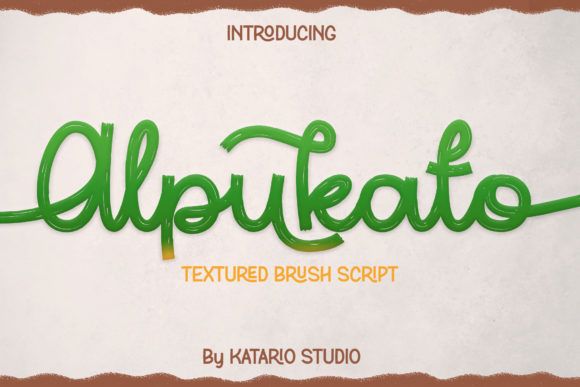
Alpukato is a handwritten font that feels personal, almost like a note scrawled in the margins of a journal. Its visual personality is soft yet expressive, making it ideal for websites that aim to feel approachable, creative, or lifestyle-focused. The character shapes are irregular in the best way—each letter carries a subtle variation that mimics real handwriting, adding a human touch to digital interfaces.
This font isn’t just about style; it’s about mood. It radiates a sense of authenticity that can be hard to achieve with more rigid typefaces. Whether you're designing a coaching website or a product landing page, Alpukato adds emotional appeal without sacrificing readability.
Using Alpukato in Real Web Projects
I tested Alpukato across several scenarios, from hero sections to call-to-action buttons. In one case, I used it as the main headline for a course sales page. The font's elegance helped draw attention without overwhelming the content. When paired with a clean sans serif font like Montserrat for body text, the contrast worked beautifully, guiding the eye naturally through the layout.
On mobile screens, Alpukato performed well too. While I did adjust the font size slightly for smaller devices, the legibility remained intact. For image overlays, where text sits atop a background, Alpukato’s subtle variations in stroke thickness helped it stand out without needing heavy outlines or drop shadows.
Another use case was a blog header. Here, Alpukato added a personal flair that matched the tone of the content—thoughtful, artistic, and slightly whimsical. It also worked well as a decorative accent in sidebars or navigation menus, though I kept it limited to short phrases to avoid clutter.
When and Where to Use Alpukato
Alpukato shines in display areas rather than dense blocks of text. It’s perfect for hero titles, section headings, button labels, and logo text. Its charm makes it an excellent choice for creative portfolios, boutique stores, and any brand looking to build a warm, inviting digital presence.
However, it’s not suitable for long paragraphs or small navigation links. The decorative nature of the font can make it challenging to read in extended form or at very small sizes. For these cases, pairing Alpukato with a simpler, more readable body font is essential to maintain accessibility and usability.
For instance, on a product landing page, I used Alpukato for the headline “Handcrafted with Love” while relying on a sans serif font for the supporting copy. This combination ensured that the design remained both visually engaging and easy to scan.
Font Pairing and Practical Considerations
Font pairing is crucial when using a decorative font like Alpukato. I found that it pairs exceptionally well with minimalist sans serifs such as Open Sans or Lato. These fonts provide a strong contrast that keeps the design balanced and professional.
For editorial-style sites, a simple serif font like Georgia or Merriweather can complement Alpukato’s hand-drawn aesthetic, creating a more literary or refined feel. If you’re aiming for a bold look, consider pairing it with a strong sans serif for headings and a lighter variant for subheadings.
Before using Alpukato on client projects, it’s important to check the font’s features. Ensure it includes all necessary styles, alternates, and ligatures for your needs. Also, confirm that it supports the languages and characters required for your audience. Commercial licensing should be reviewed carefully if you plan to use it in online stores, templates, or digital assets.
Lastly, verify that Alpukato is available as a webfont. This ensures smooth rendering across different browsers and devices, which is essential for maintaining a consistent user experience.